Skip to content
STACKDownload the app

Soft launch · Closed test open

Stack makes you remember what you read.

Highlight anything. Stack brings it back. Save an article or a PDF, select the lines that matter, and every morning three of them come back. Save → Highlight → Remember.

  • Free
  • Open source
  • Works offline
  • No ads
  • हिंदी में भी
Stack's Today screen: Right now, Your day and quick actions

The problem

You read a lot. A week later, you remember almost none of it.

Bookmarks pile up and highlights stay buried. Stack is built around one habit: keep the lines that matter, and see them again before you forget them.

When you open the app

YOUR FIRST MINUTE

The same five steps you’ll see on your phone, in the same order. You make your first highlight before Stack asks for anything.

Stack’s first screen: Stack makes you remember what you read, with the first of three cards, Save from any app
  1. Step 01

    Three cards

    Save from any app. Select a line, and it becomes a note. Every morning, three come back. Or tap Skip.

  2. Step 02

    What are you reading for?

    Exams (GATE, JEE, NEET, UPSC), work and skills, staying informed, or just for you. Stack sets up Today and your news around it.

  3. Step 03

    Try it

    A two-minute article opens with one line already highlighted. Select one more line and tap Highlight. Tomorrow morning, both come back.

  4. Step 04

    Make it yours

    Add your name and a photo, so Stack knows what to call you. You can skip this and do it later.

  5. Step 05

    Keep your notes safe?

    Only now does Stack offer an account, to back up and sync your notes. “Continue without an account” works just as well.

Inside the app

FIVE TABS

Stack has the same five tabs at the bottom of every screen: the loop first (Today, Library, Review, Notes), the news last. Here’s what’s in each one, in the same order.

01 — today

TODAY

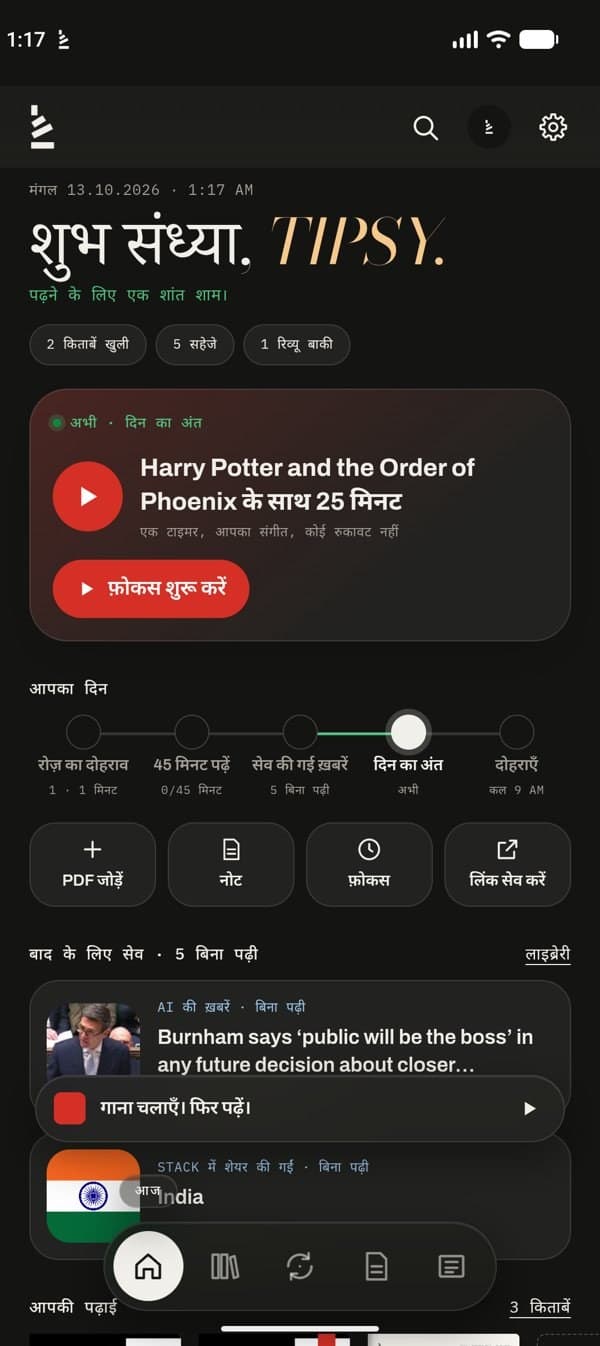
Today changes with your day. Morning, afternoon or evening, it shows the one thing worth doing right now.

  • Right now: one card with the next step, like your review, a focus session or a wind-down read
  • Your day: a timeline from the morning review to the evening wind-down
  • Quick actions: Add PDF, Note, Focus and Save link, one tap each
  • Saved for later, your reading, what you kept today and news for you, in that order
  • This week: time read, articles finished and PDF pages, a bar for each day
The Today tab: an evening greeting, the Right now card with Start focus, Your day timeline and quick actions

02 — library

BOOKS

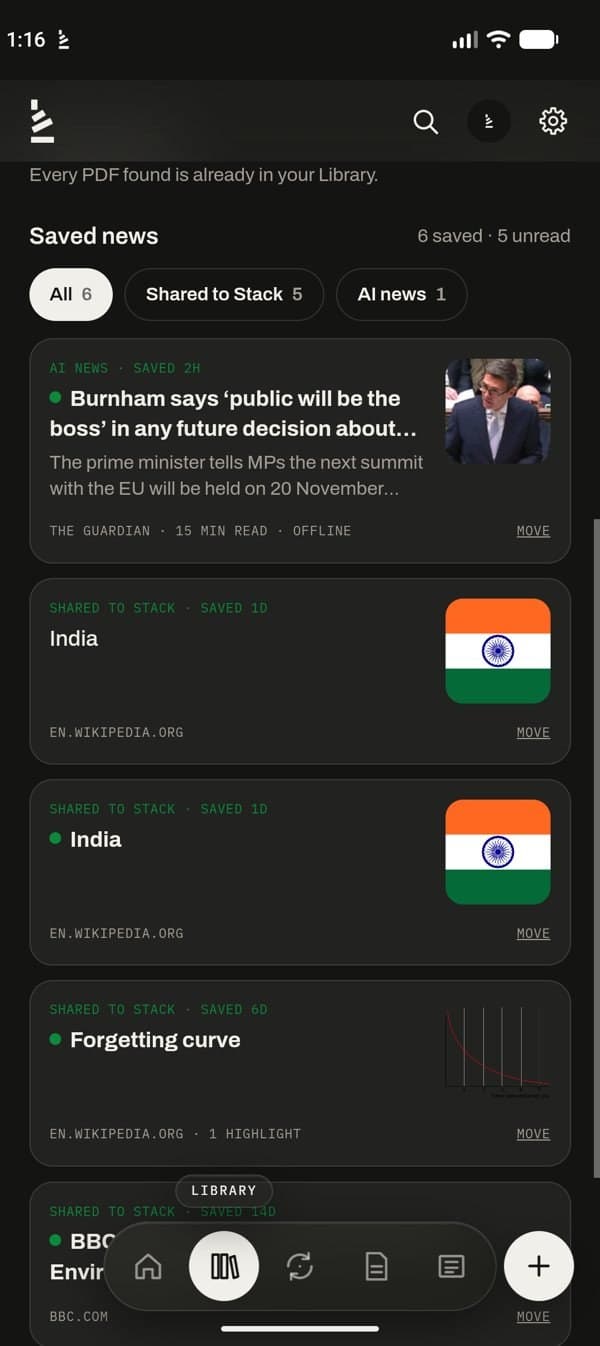
Your PDFs, books and saved articles on coloured shelves. Share anything to Stack and it lands here.

  • PDFs and EPUB books, with highlights, sticky notes, handwriting and reading time left
  • Share from Chrome, WhatsApp or Files: a “Saved to Stack” card pops up
  • Saved news in folders: by topic, or folders you make yourself
  • Import PDFs from Telegram: forward them to your bot, then pick which to add
  • Listen: articles and PDFs read aloud, with the same controls as music
The Library tab with coloured shelves of PDFs and Import from Telegram

03 — review

RECALL

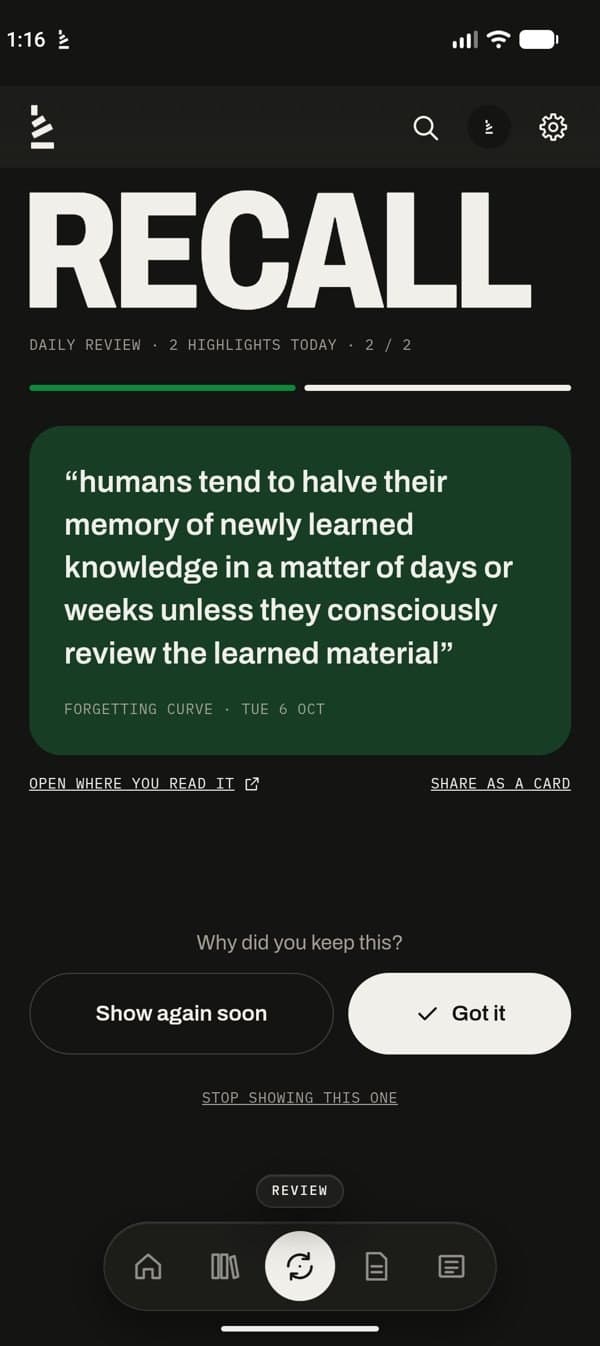
Every highlight comes back the next morning. A few seconds each, and what you read stays with you.

  • Three a day, picked from what you highlighted
  • “Got it” pushes it out: 3 days, then longer each time. “Show again soon” brings it back tomorrow
  • Words you looked up with Meaning come back too, with “Show meaning”
  • A daily alert with that day’s highlights, so the review finds you
  • Open where you read it, or share it as a card
  • A streak for each day you finish the review
The Review tab showing a highlight to recall, with Got it and Show again soon

04 — notes

Notes

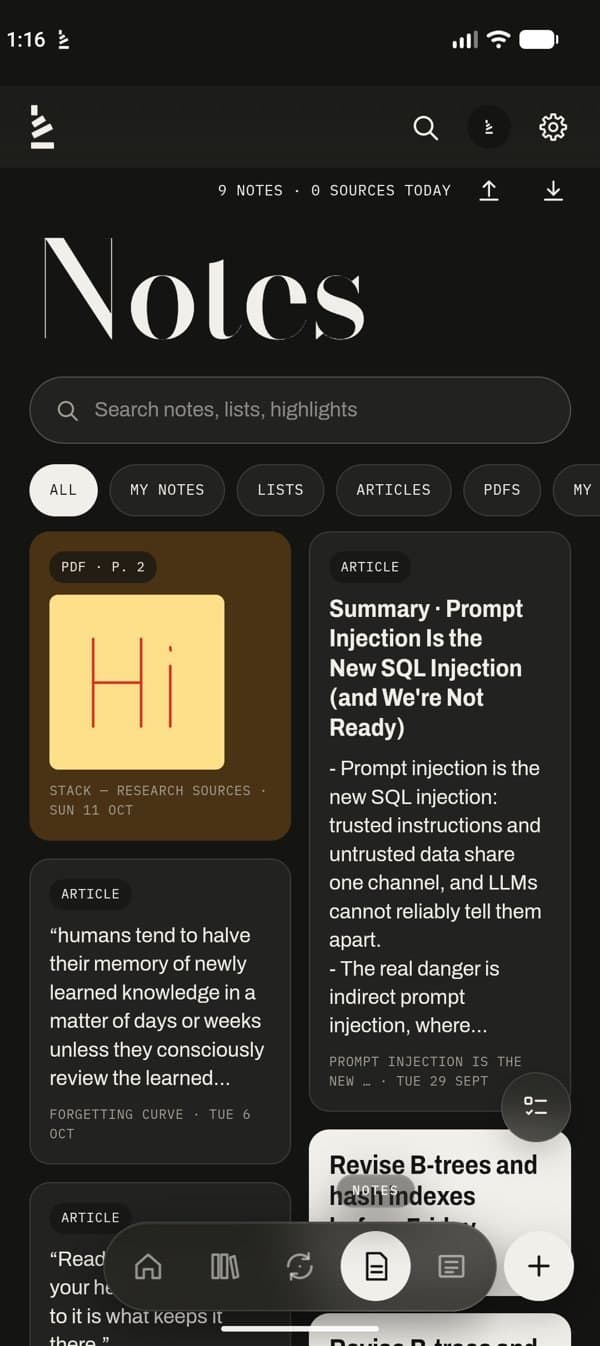
Every highlight becomes a note that remembers where it came from, next to the notes you write yourself.

  • Each highlight shows its source: the article, or the PDF and page
  • Titles, checklists, colours, tags, pins and reminders
  • One search across notes, highlights, articles and PDFs
  • Bring your Kindle highlights (My Clippings) and Readwise with you
  • Send notes to your own Notion page, or export to Markdown for Obsidian or any editor
The Notes tab with PDF and article highlights in a grid

05 — news

NEWS

12 topics from trusted sources, video news, and any site or RSS feed you add under My feeds.

  • A topic bar: Top, Following, your interests, and More for the rest
  • A list, or full-screen cards that snap one story at a time
  • Read any story in Hindi, or in 19 more languages, with one tap
  • Today’s paper: free official sources, from PIB and DD News to Hindi e-papers
  • Save a story to read it in a clean reader mode, even offline
  • Alerts for the topics you pick, with Read and Save for later right in the notification
The News tab: News Today with the topic bar, trending tags and today’s posts

Even when Stack is closed

IT COMES TO YOU

You don’t have to remember to open Stack. What you highlighted and what you follow come to your notifications, and one tap keeps it.

  • Your highlights, every day

    One alert a day with that day’s highlights. Read them on the lock screen, or tap to start the review.

  • News you can keep

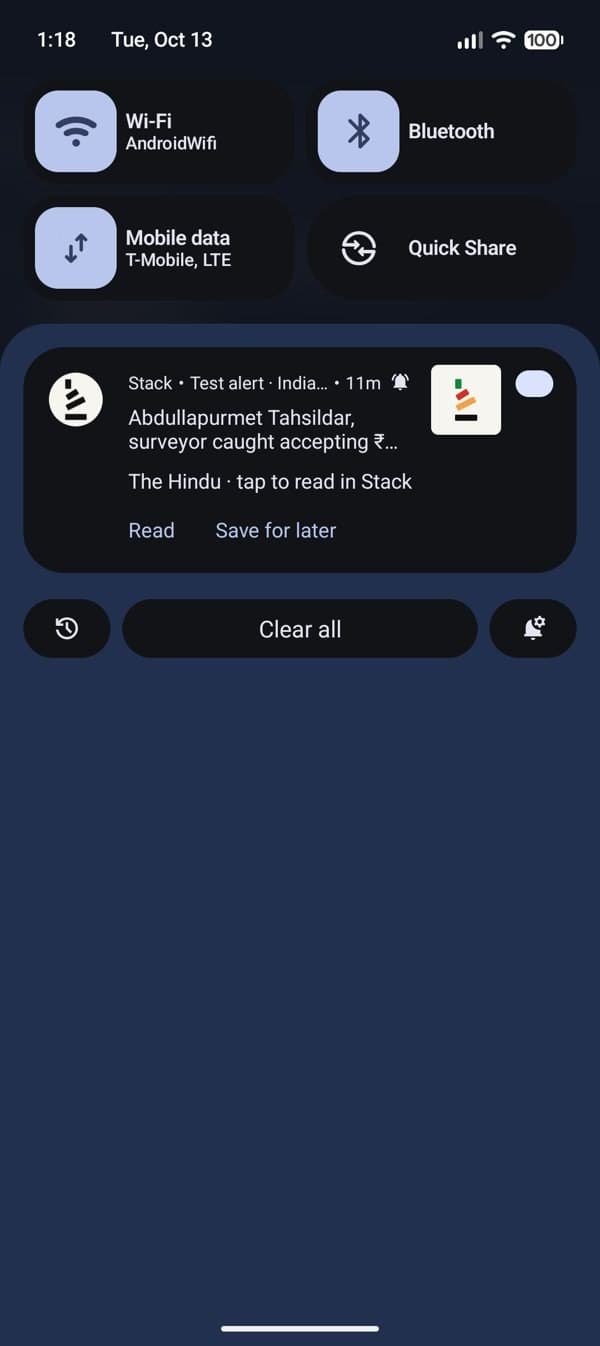
    Alerts for the topics you follow show the headline and a short summary, with Read and Save for later as buttons.

  • Saved news, sorted

    Anything you save from an alert, or share to Stack, lands in Library → Saved news, in folders by topic or your own.

A Stack news alert in the notification shade, with Read and Save for later

Made in India, for India

हिंदी में भी

  • The whole app in Hindi. Every menu, button and message, with one switch in Settings.
  • Any story, in your language. Hindi with one tap, or 19 more languages, from Bengali to Japanese.
  • Today’s paper. PIB, AIR, DD News, Yojana and the Hindi e-papers, straight from their official sites.
  • Summaries in Indian languages. Stack AI answers in Hindi, Bengali, Tamil, Telugu and six more.
Stack’s Today screen in Hindi: शुभ संध्या, the Right now card and Your day
Settings → Language → हिंदी
A news story translated into Hindi in the reader
Read in: हिंदी
The Today’s paper sheet with PIB, News On AIR, DD News and Hindi e-papers
News → Today’s paper

While you read

FOCUS & MUSIC

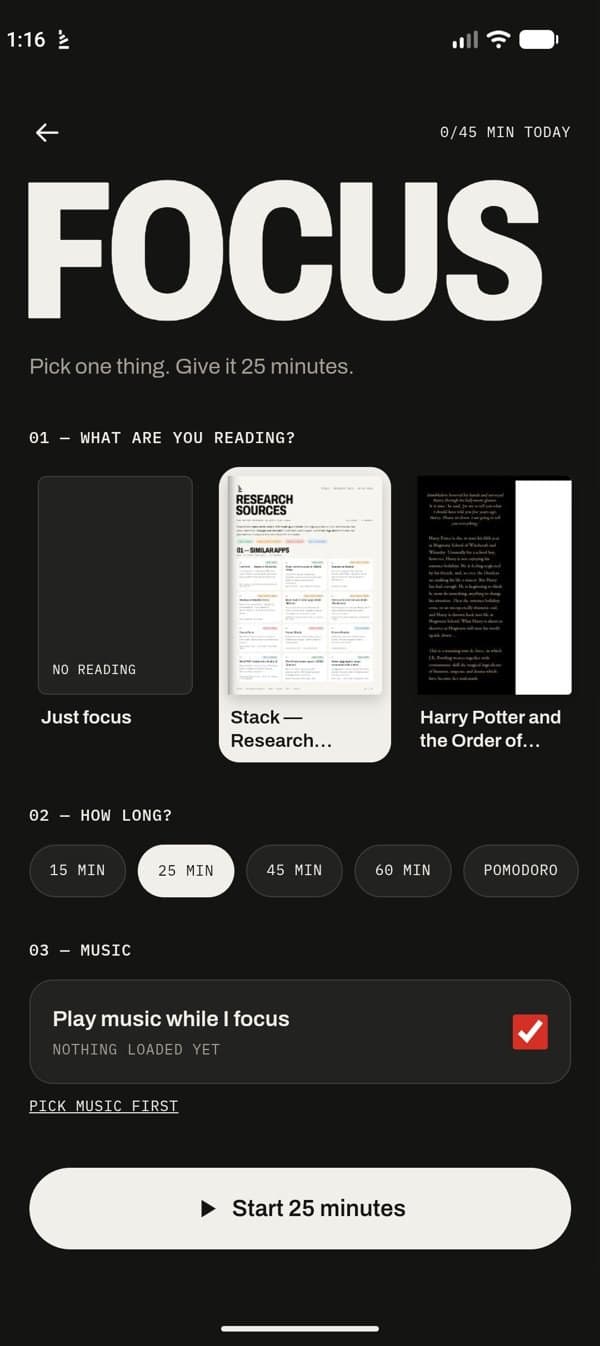
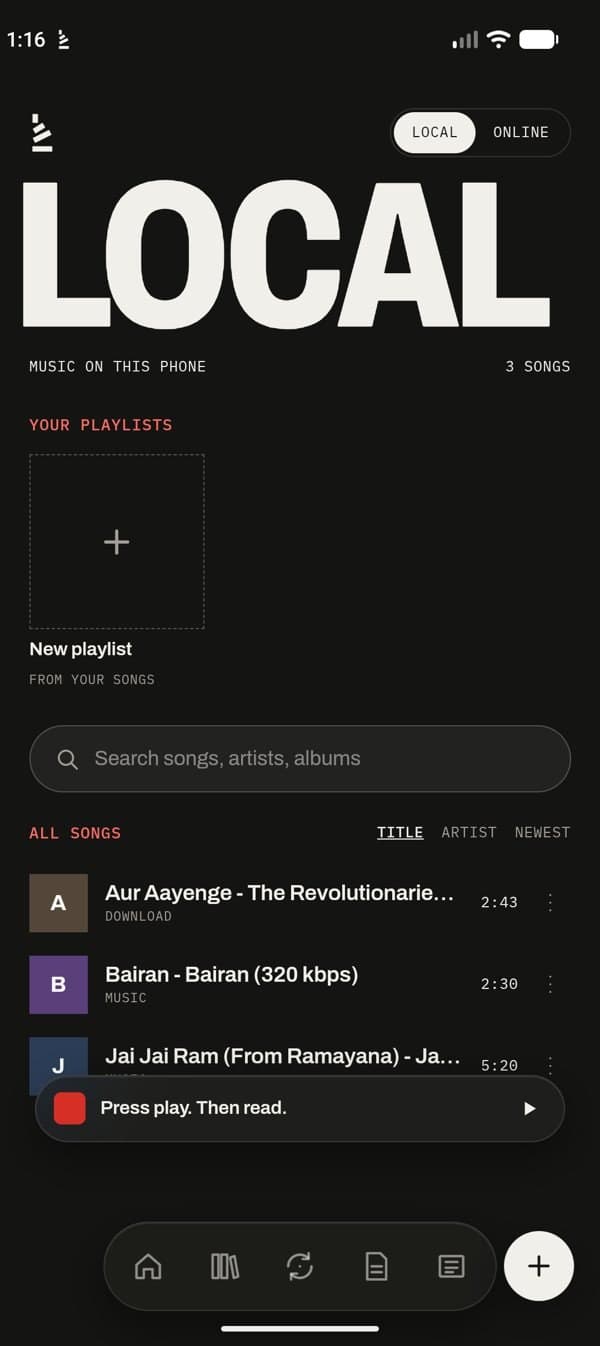
Pick one thing and give it 25 minutes. Music plays in the background, in a slim bar above the tabs, and pauses on your breaks.

  • 15, 25, 45 or 60 minutes, or Pomodoro rounds with breaks
  • Capture a thought without leaving the page; it’s saved to Notes
  • A summary at the end: minutes, pages, highlights and notes
  • Songs on your phone, or free music online
  • Shuffle, repeat, speed, sleep timer and an Up next queue
The Focus screen: pick what to read, how long, and music

Your reading stays yours

LOCAL FIRST

  • Works offline, no account

    Notes, highlights, PDFs and saved articles live on your phone, readable without a connection. Sign in only if you want sync.

  • No ads, no trackers

    We don’t sell or share your data, and never will.

  • AI only when you ask

    Stack AI is optional, asks before any text leaves your phone, and turns off completely in Settings.

  • Open source

    Built in the open by StackForge Labs, made in India.

Soft launch

BE ONE OF THE FIRST

We’re inviting a small group to use Stack before the public Play Store release. Join the list and we’ll send your invite by email.

  • Early access to the Android app
  • A direct line to the people building it
  • Stack Plus free for a year when it arrives

Try it now

Don’t want to wait for the invite? Download the Android app (APK) from Google Drive and install it today.

Download Stack (APK)

What happens next

  1. 01Join the list here
  2. 02We email you an invite link
  3. 03Tap it, opt in, and install Stack from Google Play
  4. 04Open Stack: your first minute starts, as above

For the Android test, use the Gmail address on your phone.

Questions

FAQ

What is a soft launch?

Stack is finished enough to use every day, and we're opening it to a small group first. Testers get the Android app early through Google Play's closed test, and their feedback shapes the public release.

How do I install the APK?

Open the download link on your Android phone, tap the download icon in Google Drive, then open the file. If Android asks, allow your browser or Files app to install unknown apps, then tap Install. When Stack reaches the Play Store, it will update from there.

Is it free?

Yes. Stack is free and open source. Testers will also get Stack Plus free for a year when it arrives.

Do I need an account?

No. Stack works fully offline on your phone. Signing in is only for syncing between devices.

Can Stack read to me?

Yes. Tap the headphones on any article or PDF and Stack reads it aloud with your phone’s own voice, with play, pause, speed and a sleep timer in the notification.

Can I get my notes out?

Anytime. Export your notes and highlights to Markdown (each with a link to where you read it), send them to your own Notion page, or save a full backup file from Settings.

Can I bring my Kindle or Readwise highlights?

Yes. In Notes, tap the import button and pick your Kindle “My Clippings.txt” file, a Readwise CSV export, or connect Readwise with your own token (in the Android app). They come back in your review like any other highlight.

Is Stack in Hindi?

Yes. Settings → Language switches the whole app to Hindi: every menu, button and message. Your notes, books and news stay in the language they’re written in.

Can it translate the news?

Yes. Open any story and tap हिंदी under “Read in”, or pick from 19 more languages, including Bengali, Marathi, Tamil, Telugu, Urdu, Spanish and Japanese. Tap “English (original)” to switch back.

Where do the newspapers come from?

Today’s paper only links to official, free sources: PIB, News On AIR, DD News, Yojana and Kurukshetra, today’s print editions of The Hindu and The Indian Express, and the Hindi papers’ own e-paper sites. Stack never copies anyone’s paper.

Can I turn AI off?

Yes. Stack AI is optional, asks before sending anything, and one switch in Settings turns it off completely.

Can I import PDFs from Telegram?

Yes. Make a free bot with Telegram’s @BotFather, connect it in Library, forward PDFs to it and pick which ones to add (up to 20 MB each).

I have an iPhone. Can I join?

There's no iPhone app yet, but Stack also runs in the browser. Join with launch news only and we'll tell you when the web version opens.

What does the test ask of me?

Install the app from the invite link, stay opted in for 14 days, and use it for a few minutes on some of those days. We'll send one short feedback form.